
You spent four years earning your degree. You prepared for interviews. You got the job. And then, on your very first week, you sent an email to your manager that started with “Hey” — and watched his expression change. Or you emailed an HR team asking about your offer letter and wrote three rambling paragraphs when two sentences would have done the job. Or you replied to a client’s email at 11:30 PM with no subject line and wondered why they never responded.
Email is the single most used professional communication tool in every Indian workplace — IT companies, banks, hospitals, government offices, startups, and MNCs alike. According to a 2024 Grammarly Business Writing Report, businesses lose an estimated $1.2 trillion annually due to poor email communication. Closer to home, 64% of hiring managers report that poor email etiquette from candidates has directly influenced their hiring decisions. Your email is not just a message — it is your professional reputation, condensed into a few lines of text.
The problem is that nobody formally teaches email writing. Schools teach grammar. Colleges teach presentations. But the one skill you will use every single working day of your career — writing a clear, professional, well-structured email — is left for you to figure out on your own. This guide fixes that. It covers everything: the anatomy of a perfect email, tone and language rules, the most common mistakes freshers make in Indian workplaces, and over 20 ready-to-use templates for every situation you will face in your first job — from emailing your manager on Day 1, to following up on an offer letter, to professionally declining a meeting you cannot attend.
Why Professional Email Writing Matters More Than You Think
Before the templates, understand the stakes. In most Indian workplaces — especially IT, banking, consulting, and corporate environments — email creates your first impression before anyone meets you in person. Your email style tells your manager whether you are detail-oriented or careless, whether you respect hierarchy, whether you can communicate clearly under pressure.
| Email Situation | What a Poor Email Signals | What a Professional Email Signals |
|---|---|---|
| Applying for a job | Unprepared, casual, low-effort | Serious, detail-oriented, self-aware |
| Following up with HR | Impatient or desperate | Confident, organised |
| Emailing your manager | Lack of workplace awareness | Professionalism, respect for hierarchy |
| Emailing a client | Company reputation risk | Trustworthiness, competence |
| Requesting leave | Immature, demanding | Responsible, considerate |
| Asking a question | Lazy (could have searched) | Thoughtful, specific |
| Declining a meeting | Rude or defensive | Mature, communicative |
Research from Metaintro (2026) found that 73% of professionals say email mistakes damage workplace credibility — and that damage is often lasting. In India’s hierarchical corporate culture, where your relationship with seniors matters enormously, a poorly worded email can set back a relationship that takes months to rebuild.
The good news: professional email writing is a learnable skill. You do not need to be a great writer. You need a clear structure, the right tone, and a basic understanding of what the person on the other end needs from you.
The Anatomy of a Perfect Professional Email
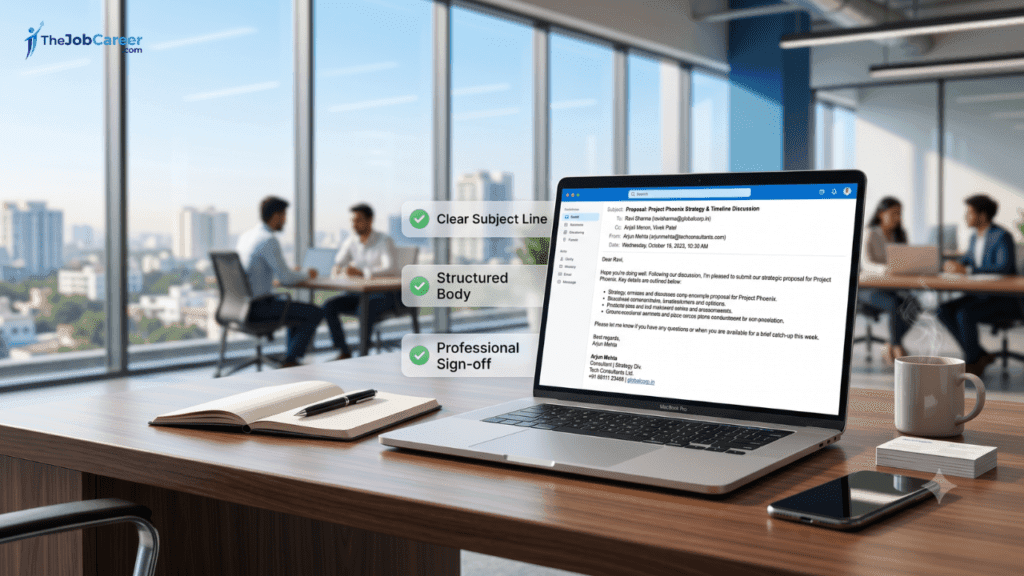
Every professional email has six parts. Mastering each part is the foundation of everything else in this guide.
| Part | What It Is | Common Mistake |
|---|---|---|
| 1. Subject Line | One-line summary of the email’s purpose | Too vague (“Hello”), too long, or missing |
| 2. Salutation / Greeting | How you address the recipient | “Hey”, no greeting at all, wrong name |
| 3. Opening Line | First sentence — context or purpose | “I hope this email finds you well” (overused but acceptable) |
| 4. Body | The main message — clear, brief, structured | Too long, rambling, no clear ask |
| 5. Closing Line | Wrap up and next step | Missing, abrupt, or passive |
| 6. Sign-off + Signature | Formal goodbye + your name and details | Casual sign-off, missing contact info |
Let us go through each part in detail.
Part 1: The Subject Line — The Most Underrated Part of Any Email
Your subject line determines whether your email is opened, ignored, or filed away for later. In a busy Indian workplace, managers and HR professionals receive 50–100 emails daily. A vague subject line means your email gets skipped.
The formula for a great subject line: [Action/Purpose] + [Context] + [Date if relevant]
| Situation | Poor Subject Line | Professional Subject Line |
|---|---|---|
| Job application | “Application” | “Application for Software Engineer Role — Rahul Mehta (3 years exp)” |
| Leave request | “Leave” | “Leave Request — June 20 to June 22, 2026” |
| Following up on offer | “Offer letter” | “Follow-Up: Offer Letter — Priya Sharma (Joining Date: July 1)” |
| Meeting request | “Meeting” | “Request for 30-Minute Meeting — Project X Timeline Discussion” |
| Sending a report | “Report” | “Q2 Sales Report — Attached (June 2026)” |
| Asking a question | “Question” | “Clarification Needed: Expense Reimbursement Policy” |
| Thanking after interview | “Thank you” | “Thank You — Software Engineer Interview, June 14” |
| Introducing yourself | “Hi” | “Introduction — Arjun Patel, New Analyst, Operations Team” |
Subject line rules:
- Keep it under 60 characters — anything longer is cut off on mobile
- Be specific — the recipient should know exactly what the email is about before opening it
- Use title case or sentence case — never all caps (“URGENT REQUEST” reads as shouting)
- Never leave the subject line blank — it signals carelessness immediately
- Add “[Action Required]” or “[For Approval]” only when genuinely needed — overuse dilutes impact
Part 2: Salutation — How to Address Anyone Correctly
The greeting sets your tone immediately. In Indian corporate culture, hierarchy matters — how you address a senior versus a peer versus an external client is different.
| Recipient | Correct Salutation | Avoid |
|---|---|---|
| Senior you have not met | “Dear Mr. / Ms. [Last Name],” | “Hey”, “Hi [First Name]” |
| Senior you know well | “Dear [First Name],” | “Hi there”, no greeting |
| Peer / colleague | “Hi [First Name],” | “Hey man”, “Bro” |
| HR or recruiter | “Dear [Name],” or “Dear Hiring Team,” | “To Whom It May Concern” (outdated) |
| Client (formal) | “Dear Mr. / Ms. [Last Name],” | First name only if relationship established |
| Group / team | “Dear Team,” / “Hi All,” / “Dear [Dept] Team,” | “Hey guys”, “All” without greeting |
| Unknown recipient | “Dear Hiring Manager,” / “Dear Sir/Madam,” | Leaving it blank |
Important note for freshers in Indian offices: Always use “Sir” or “Ma’am” in verbal communication with seniors — but in email, the standard is “Dear [Name]” rather than “Dear Sir” or “Dear Ma’am.” “Dear Sir” is grammatically and professionally correct in formal emails, but “Dear Mr. Sharma” is more modern and equally respected.
Part 3: Opening Line — Getting Straight to the Point
The opening line is where most freshers go wrong in two opposite directions: they either launch straight into the request without any context (“Please send me the report by EOD”) or they pad the email with unnecessary filler (“Hope you are doing well. Trust this email finds you in the best of health. I am writing to you today regarding…”).
The professional middle ground:
| Situation | Ideal Opening Line |
|---|---|
| Sending a report or task | “Please find attached the [document name] as requested.” |
| Requesting something | “I am writing to request [specific thing] regarding [context].” |
| Following up | “I am following up on my previous email dated [date] regarding [topic].” |
| Responding to an email | “Thank you for your email. I am happy to [action].” |
| Introducing yourself | “I am [Name], the new [Role] joining the [Team] from [Date].” |
| Asking a question | “I have a quick question regarding [topic].” |
| Sharing an update | “I wanted to update you on the status of [project/task].” |
“I hope this email finds you well” — this is the most overused opening line in Indian corporate email. It is not wrong. But if you want to stand out as a sharper communicator, replace it with a line that immediately states the purpose. Reserve the pleasantry for emails to clients or external contacts where relationship-building matters more.
Part 4: The Body — Clear, Brief, and Structured
The body of a professional email should be as short as possible while being as clear as necessary. In Indian workplaces, long emails are rarely read in full. Your manager or client reads the first two lines, skims the rest, and looks for the ask. Structure accordingly.
The 3-sentence rule for simple emails:
- Context — why you are writing
- Specific request or information
- Next step or deadline
For complex emails — use bullets and structure:
- State the purpose in the first line
- Use bullet points for multiple items, steps, or options
- Bold any key names, dates, or action items
- Keep paragraphs to 3–4 lines maximum
- End with a clear ask or next step
Tone guide for body content:
| Situation | Tone | Language Style |
|---|---|---|
| Emailing a senior Indian manager | Respectful, formal | “I would like to request”, “Kindly advise”, “Please let me know” |
| Emailing a peer | Friendly, professional | “Can you share”, “Let me know if you need anything” |
| Emailing a foreign client | Neutral, direct | “Please find attached”, “I look forward to your feedback” |
| Emailing HR | Formal, polite | “I would appreciate if you could”, “At your earliest convenience” |
| Emailing under urgency | Firm but respectful | “I wanted to flag this urgently”, “Given the deadline of [date]” |
Part 5: Closing Line — End with a Clear Next Step
Never end an email abruptly. The closing line wraps up the message and tells the recipient what you expect next.
| Situation | Closing Line |
|---|---|
| Requesting something | “Please let me know at your earliest convenience.” |
| Sending a deliverable | “Please review and share your feedback by [date].” |
| Following up | “I look forward to your response.” |
| Offering help | “Please feel free to reach out if you need any clarification.” |
| After an interview | “I look forward to the next steps in the process.” |
| Scheduling a meeting | “Please let me know your availability and I will send a calendar invite.” |
| General formal close | “Thank you for your time and consideration.” |
Part 6: Sign-off and Signature — Never Leave These Out
Your sign-off is the professional goodbye. Your signature is your digital business card.
Sign-off options by formality level:
| Formality Level | Sign-off | Use For |
|---|---|---|
| Most formal | “Yours sincerely,” | First contact, senior external recipients |
| Formal | “Regards,” | Standard professional emails — use this most often |
| Warm formal | “Warm regards,” | Colleagues, known clients, internal communication |
| Friendly professional | “Best regards,” | Peers, familiar contacts |
| Avoid | “Thanks and regards,” | Grammatically incorrect but widely used in India — acceptable informally |
| Avoid | “Cheers,” / “Take care,” | Too casual for most Indian corporate settings |
| Never use | “Love,” / “XOXO,” / “Bye,” | Completely unprofessional |
Professional email signature format:
Regards,

[Your Full Name]
[Your Designation] | [Department]
[Company Name]
📞 [Mobile Number]
📧 [Official Email ID]
[LinkedIn Profile URL — optional but recommended]
Example:
Regards,

Ananya Desai
Junior Software Engineer | Backend Development
Infosys Limited
📞 +91 98765 43210
📧 ananya.desai@infosys.com
linkedin.com/in/ananyadesai
Keep your signature clean. No motivational quotes. No excessive logos. No ten lines of legal disclaimer unless your company mandates it.
20+ Ready-to-Use Email Templates for Freshers
These are real templates you can copy, customise with your details, and send immediately. Organised by situation.
📋 Category 1: Job Application and Recruitment Emails
Template 1: Job Application Email (Applying directly via email)
Subject: Application for [Job Title] — [Your Name] | [Your Qualification/Experience]
Dear Hiring Team / Dear Mr./Ms. [Recruiter Name],

I am writing to apply for the position of [Job Title] at [Company Name], as advertised on [Portal/Source — e.g., Naukri, LinkedIn, Company Website].

I hold a [Degree] in [Specialisation] from [College Name] (Batch of [Year]) and have [X years of / no prior] experience in [relevant field]. I am confident that my skills in [Skill 1], [Skill 2], and [Skill 3] align well with the requirements of this role.

Please find my resume attached for your review. I would welcome the opportunity to discuss how I can contribute to [Company Name].

Thank you for your time and consideration.

Regards,
[Your Full Name]
[Mobile Number]
[Email ID]
[LinkedIn Profile — optional]
Template 2: Following Up on a Job Application
Subject: Follow-Up: Application for [Job Title] — [Your Name]
Dear Mr./Ms. [Name] / Dear Hiring Team,

I am writing to follow up on my application for the [Job Title] position submitted on [Date].

I remain very interested in this opportunity and would love to discuss how my background in [relevant skill/field] could contribute to your team. If my application is still under consideration, I would be happy to provide any additional information you may need.

Thank you for your time. I look forward to hearing from you.

Regards,
[Your Full Name]
[Mobile Number]
[Email ID]
Template 3: Thank You Email After an Interview
Subject: Thank You — [Job Title] Interview on [Date]
Dear Mr./Ms. [Interviewer's Name],

Thank you for taking the time to interview me for the [Job Title] position on [Date]. I truly enjoyed our conversation and learning more about the [specific team/project/company initiative discussed].

The discussion reinforced my enthusiasm for this role, particularly [mention one specific thing you found exciting — e.g., "the focus on building scalable microservices" or "the team's approach to client onboarding"]. I believe my experience in [relevant skill] would allow me to contribute meaningfully from day one.

Please let me know if you need any additional information. I look forward to the next steps in the process.

Warm regards,
[Your Full Name]
[Mobile Number]
[Email ID]
Template 4: Requesting an Update on Offer Letter
Subject: Follow-Up: Offer Letter — [Your Name] | Joining Date: [Date]
Dear Mr./Ms. [HR Name] / Dear HR Team,

I hope you are doing well. I am writing to follow up on my offer letter for the position of [Job Title] at [Company Name].

I received verbal confirmation of my selection on [Date] and was informed that the offer letter would be shared by [Expected Date]. As I need to complete my resignation formalities / plan my joining arrangements, I would greatly appreciate an update on the same.

Please let me know if any additional documents or information are required from my end.

Thank you for your time.

Regards,
[Your Full Name]
[Mobile Number]
[Email ID]
Template 5: Accepting a Job Offer
Subject: Offer Acceptance — [Job Title] | [Your Name]
Dear Mr./Ms. [HR Name],

Thank you for extending the offer of employment for the position of [Job Title] at [Company Name]. I am delighted to formally accept this offer.

I confirm my joining date as [Date] and will report to [Location/Office Name] as specified in the offer letter. I have read and understood the terms and conditions outlined in the offer letter and accept them in full.

Please let me know if there are any pre-joining formalities, documents, or onboarding steps I should complete before my joining date.

I look forward to being part of the [Company Name] team.

Regards,
[Your Full Name]
[Mobile Number]
[Email ID]
Template 6: Declining a Job Offer Professionally
Subject: Offer Declination — [Job Title] | [Your Name]
Dear Mr./Ms. [HR Name],

Thank you very much for offering me the position of [Job Title] at [Company Name]. After careful consideration, I have decided to decline this offer as I have accepted another opportunity that more closely aligns with my current career goals.

I sincerely appreciate the time and effort the team invested in the interview process, and I have a great deal of respect for [Company Name] and its work. I hope our paths cross again in the future.

Thank you once again for this opportunity.

Regards,
[Your Full Name]
[Mobile Number]
[Email ID]
🏢 Category 2: Workplace and Manager Emails
Template 7: Introduction Email to Your New Team (Day 1)
Subject: Introduction — [Your Name], New [Job Title], [Department]
Dear Team,

I am [Your Name], and I am thrilled to be joining [Company Name] as a [Job Title] in the [Department] team, effective [Date].

I come from [College/Previous Company] where I [briefly — studied/worked on relevant area]. I am passionate about [relevant interest — e.g., "building scalable backend systems" / "data-driven marketing" / "client relationship management"] and I am eager to learn and contribute to the team.

I would love to connect with each of you over the coming weeks. Please feel free to reach out — I am always happy to grab a coffee (virtual or otherwise) and learn more about what you all are working on.

Looking forward to a great journey ahead with everyone.

Regards,
[Your Full Name]
[Designation] | [Department]
[Mobile Number]
Template 8: Sending Work to Your Manager for Review
Subject: [Document/Task Name] — Ready for Review | [Your Name]
Dear [Manager's Name],

Please find attached the [document/task name — e.g., "Q2 Performance Analysis Report"] as requested.

Key highlights:
• [Point 1 — e.g., "Revenue grew 12% QoQ across all segments"]
• [Point 2 — e.g., "Three underperforming SKUs identified with recommendations"]
• [Point 3 — e.g., "Action items listed on the final page"]

Please review at your convenience and share your feedback by [Date, if applicable]. I am happy to make any revisions or clarify any sections.

Regards,
[Your Full Name]
[Designation]
Template 9: Requesting Leave from Your Manager
Subject: Leave Request — [Your Name] | [Date/s]
Dear [Manager's Name],

I would like to request leave from [Start Date] to [End Date] ([Number] working days) due to [brief reason — e.g., "a family function" / "medical reasons" / "personal travel"].

I have ensured the following before applying for leave:
• [Task 1] has been completed and submitted
• [Task 2] will be covered by [Colleague's Name] in my absence
• I will be reachable on [Mobile Number] in case of urgent matters

I have applied for the leave on [HR portal/system name] as well. Kindly approve at your earliest convenience.

Thank you.

Regards,
[Your Full Name]
[Designation]
Template 10: Asking Your Manager a Question
Subject: Clarification Needed — [Topic]
Dear [Manager's Name],

I hope you are doing well. I have a quick question regarding [specific topic — e.g., "the expense reimbursement process" / "the project handover timeline"].

[State your specific question clearly in 1–2 sentences. Be precise — what exactly do you need to know?]

I checked [mention what you already looked at — e.g., "the HR portal and the employee handbook"] but could not find a definitive answer. I would appreciate your guidance.

Thank you for your time.

Regards,
[Your Full Name]
[Designation]
Template 11: Sharing a Project Status Update
Subject: Project Status Update — [Project Name] | Week of [Date]
Dear [Manager's Name / Team],

Please find below the status update for [Project Name] for the week of [Date].

**Completed this week:**
• [Task 1]
• [Task 2]

**In progress:**
• [Task 3] — Expected completion: [Date]
• [Task 4] — Blocked by: [Dependency/issue]

**Planned for next week:**
• [Task 5]
• [Task 6]

**Issues/blockers to flag:**
• [Issue, if any — and what you need from the manager to resolve it]

Please let me know if you would like to discuss any of the above.

Regards,
[Your Full Name]
[Designation]
Template 12: Requesting a Meeting with Your Manager
Subject: Request for 30-Minute Meeting — [Topic]
Dear [Manager's Name],

I would like to schedule a brief meeting with you to discuss [specific topic — e.g., "my Q1 performance feedback" / "the architecture approach for Module 3" / "my career development plan"].

Would any of the following slots work for you?
• [Option 1 — e.g., "Tuesday, June 17 — 10:00 AM to 10:30 AM"]
• [Option 2 — e.g., "Wednesday, June 18 — 3:00 PM to 3:30 PM"]
• [Option 3 — "Any time Thursday afternoon"]

I will prepare a brief agenda beforehand to ensure we use the time efficiently. Please let me know your preference and I will send a calendar invite.

Thank you.

Regards,
[Your Full Name]
[Designation]
Template 13: Apologising for a Mistake at Work
Subject: Apology and Correction — [Brief Description of Issue]
Dear [Manager's Name],

I want to sincerely apologise for [describe the mistake clearly — e.g., "the error in the client report I submitted on June 12" / "missing the deadline for the module testing submission"].

I take full responsibility for this oversight. To correct the situation, I have [describe immediate action — e.g., "revised the report and attached the corrected version" / "informed the client and re-scheduled the delivery"].

I have also put in place [describe what you are doing to prevent recurrence — e.g., "a checklist review process before submitting any client deliverable going forward"].

I assure you this will not happen again. Thank you for your patience and understanding.

Regards,
[Your Full Name]
[Designation]
👥 Category 3: Client and External Emails
Template 14: Introducing Yourself to a Client
Subject: Introduction — [Your Name], [Your Role], [Company Name]
Dear Mr./Ms. [Client Name],

I hope this email finds you well. I am [Your Name], [Your Designation] at [Company Name], and I will be your primary point of contact for [project/account name] going forward.

[Previous contact's name] has briefed me on your ongoing requirements, and I have reviewed all relevant documentation. I want to assure you of continued support and a smooth transition.

I would love to schedule a brief introductory call at your convenience to align on priorities and ensure we are on the same page. Could you please share your availability for a 20–30 minute call this week or next?

Thank you for the opportunity to work with you. I look forward to a productive partnership.

Warm regards,
[Your Full Name]
[Designation] | [Company Name]
[Mobile Number]
[Email ID]
Template 15: Sending a Deliverable to a Client
Subject: [Deliverable Name] — [Project Name] | [Company Name]
Dear Mr./Ms. [Client Name],

Please find attached the [deliverable name — e.g., "Phase 1 Design Document"] for [Project Name].

Key highlights of this submission:
• [Point 1]
• [Point 2]
• [Point 3]

We would appreciate your review and feedback by [Date]. Please do not hesitate to reach out if you have any questions or require clarification on any section.

Thank you for your continued partnership.

Warm regards,
[Your Full Name]
[Designation] | [Company Name]
[Mobile Number]
[Email ID]
Template 16: Following Up with a Client (No Response)
Subject: Follow-Up: [Previous Email Subject] — [Your Name], [Company Name]
Dear Mr./Ms. [Client Name],

I hope you are doing well. I wanted to gently follow up on my email dated [Date] regarding [topic].

I understand you may have a busy schedule, so please let me know if you need any additional information from our side or if there is a more convenient time to connect.

[If there is a deadline:] I wanted to flag that we need your confirmation/feedback by [Date] to keep the project on schedule.

Thank you for your time. I look forward to hearing from you.

Warm regards,
[Your Full Name]
[Designation] | [Company Name]
[Mobile Number]
📚 Category 4: Academic and College Emails
Template 17: Emailing a Professor for a Recommendation Letter
Subject: Request for Recommendation Letter — [Your Name] | [Programme/Company Applied For]
Dear Professor [Last Name],

I hope you are well. I am [Your Name], your student from [Course Name, Year — e.g., "Data Structures, Batch 2024"]. I am currently applying for [programme/job — e.g., "the M.Tech programme at IIT Bombay" / "the Graduate Engineer Trainee role at L&T"].

I am writing to respectfully request a recommendation letter from you. Your course significantly shaped my understanding of [subject], and I believe a recommendation from you would add great value to my application.

I have attached my resume and the application details for your reference. If you are comfortable writing this letter, the deadline is [Date]. I am happy to provide any additional information that would be helpful.

I completely understand if your schedule does not permit this and would appreciate a response either way.

Thank you sincerely for your time and guidance.

Regards,
[Your Full Name]
[Roll Number]
[Course and Year]
[Mobile Number]
Template 18: Emailing HR About an Internship
Subject: Internship Application — [Your Name] | [Your College] | [Specialisation]
Dear HR Team / Dear Mr./Ms. [Name],

I am [Your Name], a [Year — e.g., "pre-final year"] student pursuing [Degree] in [Specialisation] from [College Name]. I am writing to express my interest in an internship opportunity at [Company Name] in the [Department/Domain — e.g., "Software Development / Data Analytics / Marketing"] team.

I have strong foundational knowledge in [Skill 1] and [Skill 2], and have completed [relevant project/certification — e.g., "a data analysis project using Python and Power BI" / "Google's Data Analytics Certificate"]. I am eager to apply these skills in a real-world professional environment and contribute meaningfully to your team.

Please find my resume attached. I would be grateful for the opportunity to speak with your team about any available internship positions. I am available to join from [Available From Date] for a duration of [X weeks/months].

Thank you for your time and consideration.

Regards,
[Your Full Name]
[College Name | Year | Specialisation]
[Mobile Number]
[Email ID]
[LinkedIn / GitHub — optional]
🔧 Category 5: Miscellaneous Workplace Emails
Template 19: Requesting Work From Home Permission
Subject: WFH Request — [Your Name] | [Date/s]
Dear [Manager's Name],

I would like to request permission to work from home on [Date/s — e.g., "Monday, June 16 and Tuesday, June 17"] due to [brief reason — e.g., "a plumber repair at home that requires my presence" / "a minor illness that does not affect my work capacity"].

I will be fully available on [Mobile Number] and [Email ID] and will attend all scheduled meetings via video call. My deliverables for these days include [list tasks — e.g., "completing the API documentation and reviewing the test cases"] and I am confident I can complete them without interruption.

Please let me know if this is acceptable.

Thank you.

Regards,
[Your Full Name]
[Designation]
Template 20: Politely Declining a Meeting You Cannot Attend
Subject: Re: [Meeting Subject] — Unable to Attend | [Your Name]
Dear [Organiser's Name],

Thank you for the meeting invite for [Meeting Name] on [Date and Time].

Unfortunately, I have a prior commitment during this time slot [or: "I will be on leave on this date"]. I apologise for the inconvenience.

If possible, I would appreciate:
• A copy of the meeting notes/minutes after the discussion
• [Or: "Being looped into the email thread with any decisions made"]

If my presence is critical to this meeting, I am happy to schedule a separate 15-minute catch-up before or after to align on the key points. Please let me know what works best.

Thank you for your understanding.

Regards,
[Your Full Name]
[Designation]
Template 21: Resignation Email (For Future Reference)
Subject: Resignation — [Your Name] | [Job Title] | Notice Period: [X Days/Weeks]
Dear [Manager's Name],

I am writing to formally notify you of my resignation from the position of [Job Title] at [Company Name], effective [Last Working Date — calculated based on your notice period].

This has been a difficult decision. Working with this team has been a genuinely valuable experience, and I am grateful for the support, mentorship, and opportunities I have received here.

I am committed to ensuring a smooth handover and will do my best to document all ongoing work and brief my replacement or colleagues on pending responsibilities over the notice period.

Please let me know if there are any exit formalities or documents I should complete.

Thank you for everything.

Regards,
[Your Full Name]
[Designation]
[Mobile Number]
[Email ID]
The 15 Rules of Professional Email Writing in India
Beyond the templates, these 15 rules apply to every email you send in your professional life:
| Rule | What It Means | Why It Matters |
|---|---|---|
| 1. One email, one purpose | Each email should have exactly one clear goal | Multiple asks in one email get only partially answered |
| 2. Reply within 24 hours | Respond to work emails within one business day | Delays signal disorganisation or disrespect |
| 3. Use CC carefully | CC only people who genuinely need to be informed | Overcrowded CC chains irritate seniors |
| 4. Never use BCC to deceive | BCC is for privacy, not for blind-copying seniors to report colleagues | Considered highly unethical in most workplaces |
| 5. Proofread before sending | Read every email once before hitting Send | Spelling errors and typos damage credibility |
| 6. No capital letters for emphasis | Use bold, not CAPS, to highlight | All caps reads as shouting |
| 7. Avoid emotional emails | Never send an angry or frustrated email | Words in email are permanent — screenshot culture is real |
| 8. Do not Reply All unnecessarily | If only the sender needs your response, reply only to them | Unnecessary Reply Alls irritate everyone in the chain |
| 9. Attach before writing | Add the attachment first, then write the email | Forgetting attachments is the most common embarrassing mistake |
| 10. Name attachments professionally | “Rahul_Mehta_Resume_2026.pdf” not “resume_final_FINAL_v3.pdf” | File names reflect your organisation and professionalism |
| 11. Mobile-friendly formatting | Short paragraphs, bullets, clean layout | 60%+ of work emails are now read on mobile |
| 12. Avoid slang and abbreviations | “ASAP”, “FYI”, “EOD” are acceptable — WhatsApp abbreviations are not | “Plz”, “u”, “r u free” are never appropriate in work email |
| 13. Be careful with humour | Tone is invisible in email — sarcasm and jokes often misfire | A joke that lands in person may offend on paper |
| 14. Respect working hours | Unless urgent, send emails during work hours | Scheduling tools let you compose now and send later |
| 15. Do not forward without context | Always add context when forwarding someone’s email | Forwarding without explanation wastes everyone’s time |
Most Common Email Mistakes Freshers Make in Indian Workplaces
❌ Mistake 1: Starting with “Respected Sir/Ma’am” in Every Email
“Respected Sir” is an Indian school habit. In the corporate world — especially IT, startups, banking, and MNCs — it sounds outdated. The correct professional greeting is “Dear [Name],” or “Dear Mr./Ms. [Last Name].” Use “Respected” only in very formal government or academic communication.
❌ Mistake 2: Writing “Please Do the Needful”
“Please do the needful” is one of the most distinctly Indian corporate phrases that confuses global colleagues and signals a lack of specific thinking. Replace it with the exact action you need: “Please review and confirm by June 20” or “Please send the updated document to the client.”
❌ Mistake 3: “Same to You” as a Reply
When someone wishes you a happy holiday or anniversary in a work email and you reply “same to you” — that is fine verbally. In email, write: “Thank you! Wishing you the same.” It takes three seconds and reflects far better.
❌ Mistake 4: Giant Walls of Text
Long, unformatted paragraphs are the fastest way to ensure your email is not fully read. Break content into bullet points. Keep paragraphs under 4 lines. Bold the key ask or deadline.
❌ Mistake 5: Using Your Personal Email for Professional Communication
Sending work-related emails from a gmail ID like “coolraju99@gmail.com” to clients or external contacts is unprofessional. Always use your official company email for work communication. When applying for jobs, use a clean personal email like “firstname.lastname@gmail.com.”
❌ Mistake 6: Emailing When You Should Be Walking Over or Calling
In India’s office culture, some conversations are better in person — escalations, sensitive feedback, complex negotiations. Sending a long email chain for something that a 5-minute conversation would resolve wastes everyone’s time and can come across as passive-aggressive.
❌ Mistake 7: Not Having a Professional Email Signature
Sending emails with no signature — just a first name or nothing at all — is a common fresher habit. Set up your professional signature in your email client settings from Day 1. Every email you send is a branding opportunity.
Quick Reference: Email Dos and Don’ts
| ✅ DO | ❌ DON’T |
|---|---|
| Use a clear, specific subject line | Leave the subject line blank or vague |
| Address the recipient by name | Start with “Hey” or no greeting |
| State the purpose in the first line | Begin with excessive pleasantries |
| Keep the email brief and focused | Write long rambling paragraphs |
| Use bullets for multiple points | Write a numbered essay |
| Proofread before sending | Send without re-reading |
| Attach files before writing | Forget attachments |
| Name files professionally | Send “document1_final_v2.pdf” |
| Reply within 24 hours | Leave emails unanswered for days |
| Use “Regards” or “Warm regards” | Use “Love,” “Cheers,” or “Bye” |
| CC only relevant people | CC everyone on every email |
| Schedule emails during work hours | Email at midnight without urgency |
| Use bold to highlight key points | USE CAPS TO EMPHASISE |
| Separate multiple topics into separate emails | Cram five requests into one email |
Frequently Asked Questions
Q1. Should I write emails in English or Hindi in an Indian workplace?
Always match the language of the workplace and the recipient. In MNCs, IT companies, banks, and most corporate offices — English is the standard for written communication. In local businesses, Hindi or regional language may be acceptable for internal communication. When in doubt, English is the safer choice for any professional email, especially with seniors or external parties.
Q2. How long should a professional email be?
For simple requests and updates: 3–5 sentences. For complex topics: up to 200–250 words with bullet points. No professional email needs to be longer than 300 words unless you are sending a formal proposal, report, or legal notice. If your email is getting long, consider whether a meeting or phone call would be more efficient.
Q3. Is “Thanks and Regards” grammatically correct?
Technically, “Thanks and Regards” mixes two different types of closings and is grammatically informal. However, it is widely used and accepted in Indian corporate culture. For formal external communication, stick to “Regards” or “Warm regards.” For internal communication, “Thanks and Regards” is generally fine.
Q4. Should I use a read receipt for professional emails?
Avoid requesting read receipts in most professional situations — it can come across as mistrustful or aggressive. If you need to confirm receipt, simply add a line: “Please confirm receipt of this email” or call to follow up after 24 hours.
Q5. What is the best time to send a professional email?
Research consistently shows that emails sent between 9:00 AM and 11:00 AM on Tuesday, Wednesday, or Thursday have the highest open and response rates. Avoid sending important emails on Friday afternoon (people switch off before the weekend) or Monday morning (inbox overload). Use your email client’s scheduling feature to time your sends strategically.
Q6. Should I use emojis in professional emails?
Generally, no — especially in your first job, in emails to seniors, and in all external communication. Emojis are acceptable in informal Slack or Teams messages with close colleagues. In email, they can undermine your professional image, particularly with older managers or formal clients.
Q7. What do I do if I sent an email with a mistake?
Send a correction email immediately with the subject line “[Correction] [Original Subject]” — for example: “[Correction] Q2 Report — Updated Figures.” Acknowledge the error briefly, share the correct information, and move on. Do not over-apologise. Do not wait and hope no one noticed.
Your Professional Email Cheat Sheet — Save This
| Element | Gold Standard |
|---|---|
| Subject Line | Specific, under 60 chars, purpose-first |
| Greeting | “Dear [Name],” — always |
| Opening | Purpose stated in line 1 |
| Body | 3–5 lines or bullet points, max 250 words |
| Closing | Clear next step or deadline |
| Sign-off | “Regards,” or “Warm regards,” |
| Signature | Name, designation, company, mobile, email |
| Attachment | Named professionally, added before writing |
| Timing | Sent during work hours, replied within 24 hours |
| Tone | Formal with seniors, professional with peers |
| Proofread | Always — before every send |
Every professional email you send is a small vote for the kind of professional you are — organised or scattered, respectful or casual, clear or confusing. The freshers who are remembered as “sharp communicators” in their first year are not necessarily the most technical or the most experienced. They are the ones who write clear subject lines, give context before making a request, and actually proofread before hitting Send.
It costs you nothing to get this right. The templates above are yours — customise them, save them, build your own library over time. As you grow in your career, email becomes just one of many communication tools. But the discipline of clear, concise, respectful written communication will serve you in every job, every industry, and every stage of your career, from fresher to founder.
Write well. Communicate clearly. Build your reputation one email at a time. 🇮🇳
Related Career Skills Articles:
- How to Prepare for Interviews: Complete Step-by-Step Guide
- LinkedIn Profile Guide 2026: How to Get Noticed by Recruiters
- Resume Tips for Freshers: How to Create a Job-Winning Resume
- How to Write a Cover Letter in 2026: Format, Examples and Templates
- How to Use Job Portals Effectively: Naukri, LinkedIn & Indeed Strategy 2026
Related Job and Career Articles:
- IT Jobs for Freshers 2026: Which Companies Hire Without Experience
- Entry Level Jobs Rs. 20,000–30,000: Freshers Welcome (No Experience Required)
- How to Choose the Right Career Path After 12th
- AI Tools for Job Seekers 2026: How to Use ChatGPT and AI to Get Hired Faster
- Digital Marketing Career in India 2026: Salary, Skills and How to Start
- 7 Common Job Frauds in India: Complete Awareness Guide